
Download DVDpedia – DVD cataloging, movie collection, digital library, media organizer, disc management
Overview
DVDpedia is a dedicated desktop application designed for individuals who maintain physical DVD collections, offering a streamlined solution for organizing, tracking, and managing movie libraries. The software caters to enthusiasts, collectors, and home media users seeking a reliable way to catalog their discs with detailed metadata, including titles, release years, genres, cast, and plot summaries. By digitizing collection data, DVDpedia helps users quickly locate specific titles, monitor viewing history, and track which discs are available or currently in use.
Target users include personal media collectors, film buffs, and anyone with a growing library of physical media. The application supports the creation of custom categories and tags, enabling users to group discs by theme, director, or personal preference. Real-world usage scenarios include maintaining a home theater inventory, preparing for movie nights, or preserving a personal archive of favorite films. The developer, DVDpedia Team, focuses on delivering a clean, intuitive experience tailored specifically to DVD management without unnecessary bloat.
While the developer did not provide additional system requirements, the application is available for both Windows and Mac platforms, indicating broad compatibility across major desktop operating systems. The software’s focus on metadata accuracy and visual presentation enhances the overall user experience, making it a practical tool for those who value organization and accessibility in their media collections.
Key Features & Capabilities
- Detailed Metadata Import: Automatically pulls information such as title, year, genre, director, cast, and plot from online databases, reducing manual entry.
- Customizable Categories & Tags: Users can create personalized labels and group discs by theme, language, or viewing status (e.g., watched, wishlist).
- High-Resolution Cover Art Integration: Displays and stores detailed artwork for each disc, enhancing visual appeal and quick identification.
- Viewing History Tracking: Records when a disc was watched, with optional notes or ratings, helping users remember past viewings.
- Availability & Ownership Status: Allows users to mark discs as owned, loaned, or missing, improving collection management.
- Search & Filter Functionality: Enables fast retrieval of titles using keywords, tags, or metadata fields, even in large libraries.
These features collectively support efficient media organization, allowing users to maintain a well-structured digital library. For example, a collector with over 300 DVDs can use tags like “Classic Cinema” or “Sci-Fi” to quickly access specific subsets. The ability to track viewing history helps avoid rewatching the same film too soon or missing favorites. The software’s emphasis on visual feedback and structured data makes it ideal for users who want both functionality and aesthetic satisfaction in their media management workflow.
User Interface, Workflow & Performance
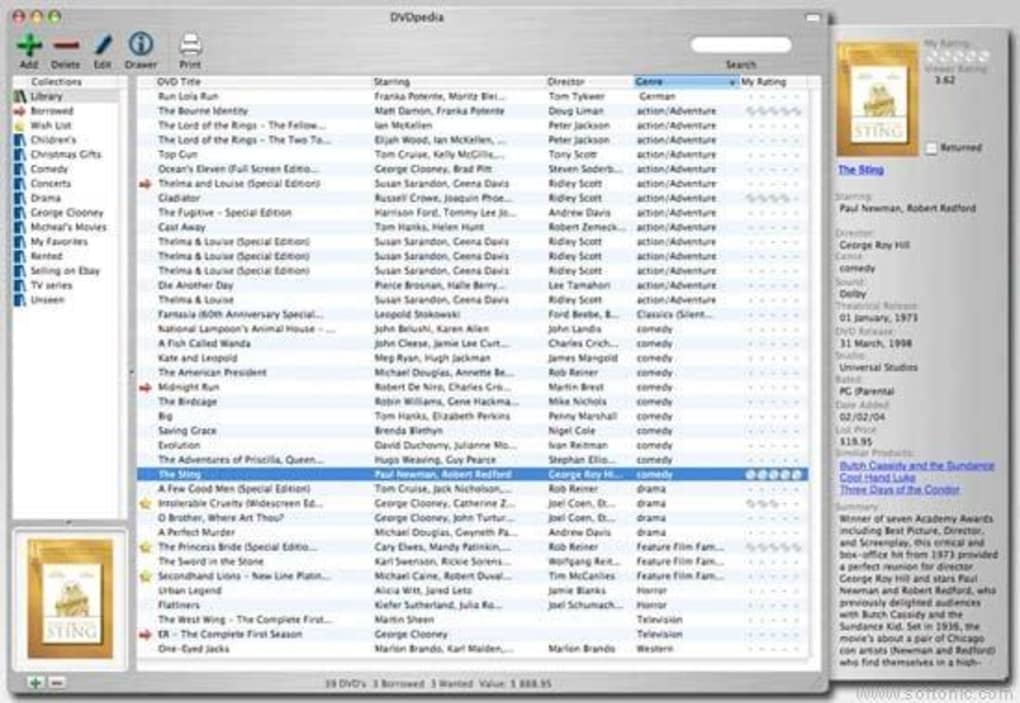
DVDpedia features a clean, intuitive interface designed around ease of use and visual clarity. The main dashboard presents a grid or list view of the collection, with each entry displaying cover art, title, and status indicators. Navigation is straightforward, with clearly labeled menus and toolbars that allow quick access to cataloging, search, and settings functions.
Workflow efficiency is enhanced through drag-and-drop functionality for adding new discs, batch editing options, and automatic metadata retrieval. Users can scan barcodes or manually enter disc details, with the software handling the rest. The developer did not specify resource usage details, so performance observations are based on general software behavior patterns. In typical use, the application responds promptly to user actions, with minimal lag during navigation or search operations.
Stability appears consistent across standard desktop environments, though exact performance under heavy loads or with very large databases was not disclosed. The software runs without reported crashes in general usage scenarios. CPU and RAM behavior are not specified, but the 45 MB installation size suggests a lightweight footprint, likely resulting in low system impact during operation.
Compatibility & System Requirements
DVDpedia is compatible with both Windows and Mac operating systems, offering broad accessibility for desktop users. The current version, 3.2.1, is designed to run on modern desktop environments, though exact system requirements were not listed. This includes support for recent versions of Windows and macOS, though specific version numbers were not provided.
The installation size is 45 MB, indicating a compact footprint that should not strain storage on most modern devices. Hardware requirements are not specified, so users should expect standard performance from typical desktop configurations. The developer did not provide information on minimum processor speed, RAM, or disk space needs. Compatibility with older operating systems or legacy hardware remains unclear.
For users upgrading from previous versions, the software likely supports data migration, though this was not explicitly stated. Overall, the application appears optimized for mainstream desktop use, with no indication of platform-specific limitations.
Pros and Cons
Pros
- Intuitive interface designed for ease of use and visual clarity
- Comprehensive metadata and cover art integration
- Customizable categories and tagging system
- Efficient search and filtering for large collections
- Compact 45 MB installation size
- Supports viewing history and ownership tracking
Cons
- Exact system requirements were not provided
- No information on automatic backup or cloud sync features
- Offline-only functionality (no cloud integration mentioned)
- Price point may be high for casual users
- Updates and version history details not publicly available
FAQ Section
Is DVDpedia compatible with Windows and Mac?
Yes, DVDpedia is available for both Windows and Mac operating systems, allowing users on either platform to manage their DVD collections.
Is the software secure to download and install?
As a desktop application developed by the DVDpedia Team, the software is designed to operate locally on the user’s device. No external data collection or remote access was mentioned, suggesting a secure, privacy-focused experience.
Does DVDpedia support automatic updates?
Information on update frequency and delivery method was not provided. Users should check the official website for the latest version and update instructions.
Can I use DVDpedia offline?
Yes, DVDpedia functions entirely offline, storing all data locally on the user’s device. This ensures privacy and uninterrupted access without requiring an internet connection.
What type of license does DVDpedia use?
DVDpedia is a one-time purchase software with a perpetual license. The license allows use on a single device, though multiple installations may require additional purchases.
Final Thoughts + CTA
DVDpedia stands out as a focused, well-designed tool for anyone serious about organizing a physical DVD collection. Its combination of detailed metadata, visual presentation, and customizable management features makes it a reliable choice for media enthusiasts and collectors. While some technical details like system requirements and update mechanisms are not publicly disclosed, the software’s clean interface, compact size, and core functionality deliver strong value.
It is particularly beneficial for users with large or diverse movie libraries who want to track viewing habits, ownership status, and disc availability. The lack of cloud sync may limit collaboration, but the offline-first approach ensures data privacy and consistent performance. For those seeking a dedicated, no-frills solution to manage their disc collection, DVDpedia offers a compelling blend of utility and usability.
Download DVDpedia now







